
The reality of storage in 2026
Storage capacity stopped being the problem years ago. Reliability is the real issue now.
Most people don't lose files because they run out of terabytes. They lose them because they trust the wrong drive, rely on a single backup, or buy storage built around marketing instead of long-term use.
That matters more than ever in 2026. High-capacity laptop SSDs stay expensive. Cloud subscriptions quietly turn into annual commitments. And creators, remote workers, photographers, and video editors store larger files every year.
Desktop external hard drives still solve that problem better than most storage categories. Not because they're the fastest, they aren't, but because no other category delivers this much storage, this affordably, this simply.
For buyers who prioritise capacity, desktop external HDDs still deliver the best value-per-terabyte in 2026. The best ones do one thing well: dependable long-term storage without friction.
This guide covers five desktop external hard drives that have earned strong reputations for reliability and real-world usability in 2026, including the ModusTech Vault Facet and ModusTech Vault Alloy.
What makes an external hard drive reliable?
A reliable external hard drive is more than one that turns on. Reliability comes from smaller decisions working together over time:
- Stable temperatures during long transfers
- Consistent power delivery
- Low-friction compatibility across devices
- Sensible enclosure design
- Reasonable warranty coverage
- Dependable backup behaviour under sustained workloads
- Strong value-per-terabyte
- Minimal setup
This is where desktop drives set themselves apart. Some chase aesthetics. Others bury users in software suites. Some still ship outdated cables that frustrate you the moment you plug into a USB-C laptop.
The most dependable drives in 2026 prioritise practical usability, which matters most for buyers storing large media libraries, business archives, RAW photography, long-form video, workstation backups, and years of personal files. Once you move into multi-terabyte territory, consistency beats benchmark screenshots.
Common desktop hard drive mistakes buyers still make
Three mistakes are worth avoiding.
1. Buying portable drives for permanent desktop use.
Portable drives excel at mobility, not at stationary, always-connected storage. Desktop drives suit long backups, media servers, archives, and workstation setups better, because their external power supply reduces strain on the host and supports stable long-duration operation.
2. Overpaying for SSDs when capacity matters more.
Portable SSDs are faster, but high-capacity SSD storage stays expensive in 2026, a 16TB SSD still costs dramatically more than a 16TB desktop HDD. For backups, archives, and media libraries, a desktop HDD wins on value-per-terabyte.
3. Ignoring connectivity.
Several desktop drives still ship a Type-A or micro-USB cable, which frustrates you immediately on modern MacBooks and USB-C workstations. Drives that include USB-C out of the box age far better.
The most reliable desktop external hard drives in 2026
No single desktop external hard drive suits every buyer. Some prioritise affordability; others focus on workstation reliability, long warranties, creative workloads, or high-capacity archives. The five below stand out for different reasons, from modern USB-C compatibility to large-scale backup storage.
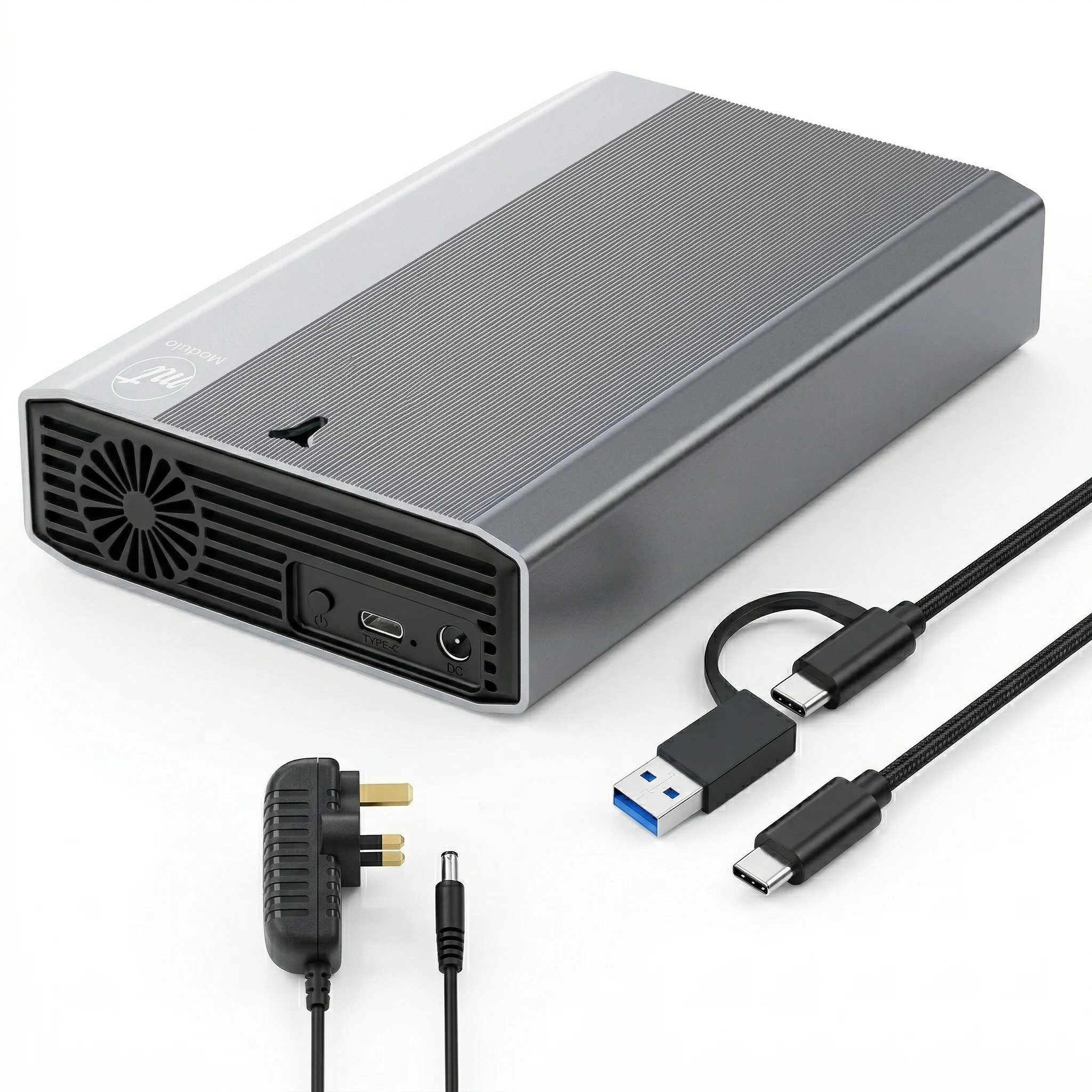
1. ModusTech Vault Alloy Desktop External Hard Drive

The ModusTech Vault Alloy earns its place because it understands what high-capacity buyers actually care about, not speed claims or gaming branding, just practical desktop storage built for sustained real-world use.
It's built around a 3.5-inch desktop HDD with capacities from 2TB to 20TB, covering everything from a single workstation backup to a full media archive.
Its real strength is usability. The Vault Alloy includes a 2-in-1 USB-C and USB-A connection in the box, minor until you've spent years buying adapters for other drives, positioning it as a modern USB-C desktop external hard drive built for current workflows. It also ships pre-formatted as exFAT, so it works across Windows and macOS straight away. That convenience beats benchmark numbers for most buyers.
The desktop-first design backs it up:
- Aluminium enclosure
- Front ventilation
- Mains-powered operation
- Capacities up to 20TB
- 2-year warranty
This doesn't chase portable SSDs. It competes as a reliable external hard drive for long-term storage, creative workflows, and backup-heavy environments.
Best for: video editors, photographers, creators archiving large projects, home office users, backup-conscious professionals, and media servers.
Where competitors fall short: several mainstream single-drive options still default to a Type-A or micro-USB cable. The Vault Alloy ships ready for USB-C workflows without premium SSD pricing.
2. WD My Book (Single-Drive Edition)

The WD My Book remains one of the most established desktop external hard drives on the market.
Western Digital built its reputation on consistency, and the My Book still perfo
rms reliably as a long-term backup drive in 2026.
It scales to high capacities, integrates well with Windows, carries a mature support ecosystem, and includes a 3-year warranty, one of the longer cover periods among mainstream consumer drives.
It falls short on simplicity. WD still leans on bundled backup software and legacy tooling
many users never want, so setup feels old-school next to plug-and-play competitors like the ModusTech Vault range.
There's also the connectivity issue.
Still, if your priority is proven brand familiarity, a long warranty, and dependable backup storage, the My Book remains a solid option.
The standard WD My Book ships with a USB 3.0 Micro-B-to-Type-A cable rather than treating USB-C as the default workflow infrastructure.
Best for: traditional desktop backup, Windows-heavy environments, and buyers prioritising long-established brands.
3. Seagate Expansion Desktop

The Seagate Expansion Desktop dominates high-capacity storage discussions for one reason: capacity-per-pound.
If you need massive storage without spending aggressively, Seagate’s desktop lineup remains highly competitive for archive and backup use.
It handles media libraries, archives, large backup repositories, and home office expansion well.
Performance lands where you’d expect from a high-capacity desktop HDD: stable, predictable, and workload-oriented rather than speed-focused.
Most retail versions work out of the box with minimal setup.
It falls behind newer entrants like the ModusTech Vault range on refinement. The enclosure is more utilitarian, and connectivity still prioritises a Type-A host connection rather than USB-C-first workflow support.
Still, for straightforward storage expansion at scale, it remains one of the safer budget choices.
Best for: large archives, budget-focused buyers, media collections, and desktop backup systems.
4. ModusTech Vault Facet Desktop External Hard Drive

The ModusTech Vault Facet suits buyers who want dependable high-capacity desktop storage without complexity.
It supports capacities from 1TB to 20TB, covering everyday backups through to larger archive and media library setups.
Its strength is balance, modern connectivity, broad compatibility, and desktop stability in one straightforward platform aimed at home office users and everyday workstations.
The Vault Facet includes a 2-in-1 USB-C and USB-A connection in the box and ships pre-formatted as exFAT for plug-and-play use across Windows and macOS.
Key features:
- USB-C connectivity
- exFAT plug-and-play compatibility
- Mains-powered desktop stability
- Capacities up to 20TB
- Anti-slip rubber padding
- Shock-protection design
The ModusTech Vault Facet positions itself as a practical desktop external hard drive built for long-term storage, backup reliability, and everyday usability.
Best for: home office users, everyday backup, family storage, media collections, and laptop storage expansion.
5. LaCie d2 Professional

LaCie occupies a different part of the market. Its drives lean heavily on design and target creative professionals in Apple ecosystems.
Build quality is genuinely strong. The LaCie d2 Professional uses a 7200 RPM enterprise-class drive over USB-C (USB 3.2 Gen 2, 10Gbps) inside an aluminium enclosure with a quiet cooling fan, backed by a 5-year warranty.
The d2 Professional fits naturally into studio environments where industrial design matters as much as storage.
The trade-off is price. LaCie carries a significant premium over plain backup drives, which makes it hard to justify for ordinary buyers who just need large, dependable storage at a sensible value-per-terabyte.
Working studios get their money's worth from the premium internals, long warranty, and aesthetics.
Everyone else gets a more balanced mix of capacity, compatibility, and cost from competitors like the ModusTech Vault Alloy.
Best for: Apple-centric creative studios, design-conscious workspaces, and premium aesthetic setups.
Which desktop external hard drive should you buy?
Buy the ModusTech Vault Alloy if: you handle large creative workloads, want a 2-year warranty, need high-capacity workstation storage, value USB-C convenience, and want a reliable external hard drive for the long term.
Buy the ModusTech Vault Facet if: you want dependable desktop backup storage, care about value-per-terabyte, want modern compatibility without overspending, and need scalable storage from 1TB to 20TB.
Buy the WD My Book if: you prefer legacy brand familiarity, already use WD's ecosystem, and prioritise established support and a long warranty.
Buy the Seagate Expansion Desktop if: your priority is raw capacity on a tighter budget and straightforward archive storage.
Buy LaCie if: design and aesthetics matter as much as storage, and you want enterprise-class internals with the longest warranty.
The bottom line
Desktop external hard drives still matter in 2026 because high-capacity storage economics still favour HDDs heavily.
For backups, archives, media libraries, workstation storage, and long-term retention, a good desktop HDD remains one of the most practical purchases you can make.
The strongest drives aren't the flashiest. They stay cool during long sessions, integrate cleanly into modern workflows, avoid friction, and hold stable over years of use.
Desktop external hard drives still matter in 2026 because high-capacity storage economics still favour HDDs heavily.
For backups, archives, media libraries, workstation storage, and long-term retention, a good desktop HDD remains one of the most practical purchases you can make.
The strongest drives aren't the flashiest. They stay cool during long sessions, integrate cleanly into modern workflows, avoid friction, and hold stable over years of use.

Featured in this article
Modustech Vault Alloy Desktop External Hard Drive
From £75.93
Shop now: Modustech Vault Alloy Desktop External Hard Drive

